Some notes with Wechat DevTools(微信开发者工具)
Recently, I got a chance to use Wechat DevTools to develop some mini-programs. Then found some problems during development that I want to take a note, apply to versions <= 2.01 with NW.js.
1. Cannot download base library
Network problem is always the headache. So need to check below parts:
Domain block
Make sure all the required domains are unblocked.
Self-signed certificate issue
This problem happens when using the company intranet because some company intranet will intercept all the network and signed by their own self-signed certificate.
Wechat DevTools uses NW.js and use request npm lib to download the base library. Wechat DevTools cannot customize the trusted CA for request right now, so the possible solution is leveraging node environment variables:
NODE_EXTRA_CA_CERTScannot work here because NW.js is different than Nodejs, it’s like some wrapper for Nodejs, so the current supported Nodejs environment variables are limited.NODE_TLS_REJECT_UNAUTHORIZEDcan work, so there are two ways to set in the Wechat DevTools- Set from the Wechat DevTools console manually, click button
Debug Wechat DevToolsorF12to open the debug devtools, then add below code in the console
process.env.NODE_TLS_REJECT_UNAUTHORIZED = 0- Set this variable from the shortcut
cmd.exe /c "set NODE_TLS_REJECT_UNAUTHORIZED=0&& "C:\Program Files (x86)\Tencent\微信web开发者工具\微信开发者工具.exe"- Set from the Wechat DevTools console manually, click button
2. Cannot update the default Typescript typings
From the official document, the way to update the Typescript typings is just clicking the button from the context menu like below.
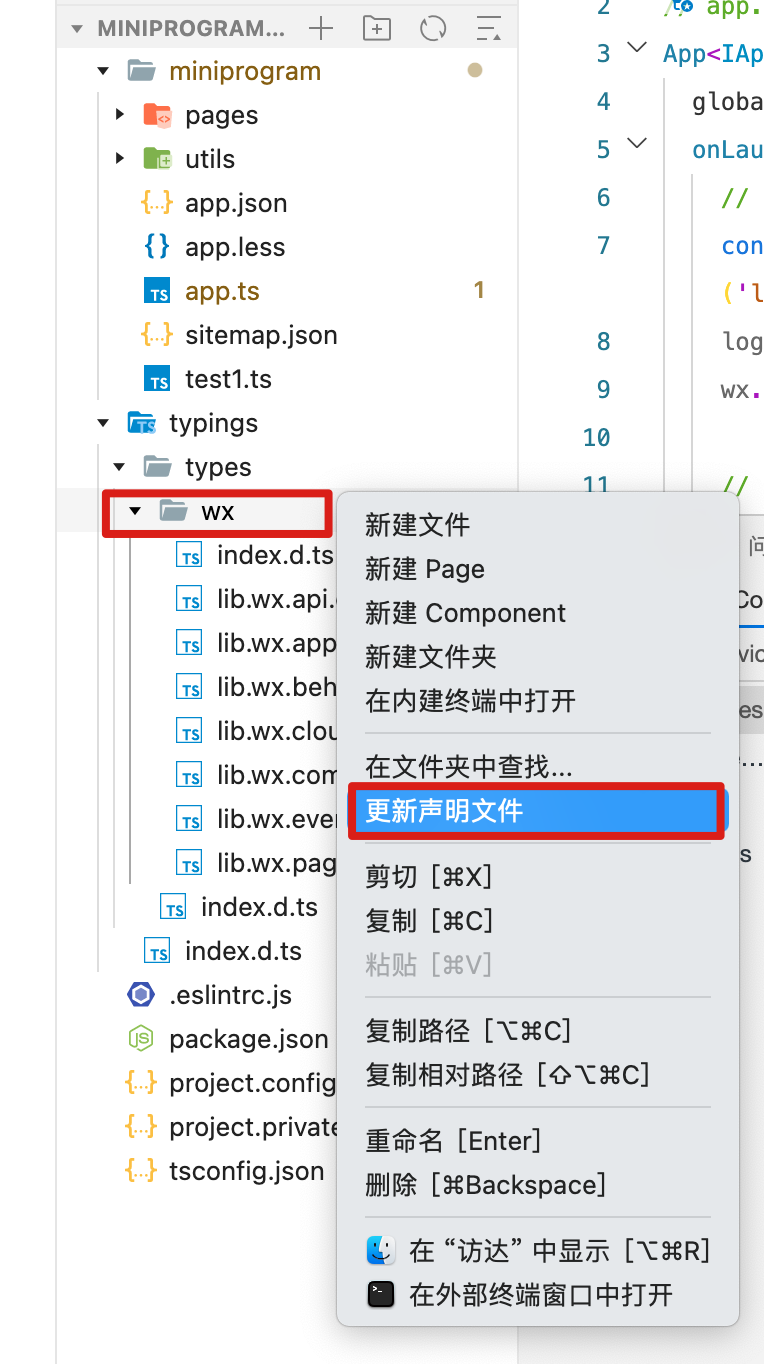
But when importing the existing mini-programs, found that this update will always fail. After some test, found that the easy way to reproduce this issue is:
- Create a new mini-program with typescript template from Wechat DevTools.
- Delete this mini-program without removing all the source code from the Wechat DevTools.
- Import in the Wechat DevTools again.
- Try to update the Typescript typings from context menu at this time.
So after some debugging, found that the problem was caused by the following code:
// from 'core.wxvpkg'
checkProjectUseTS(e) {
    var t, i, s;
    return !(!e.templateEnv || (null === (t = e.templateEnv) || void 0 === t ? void 0 : t.hybirdPluginId) || (null === (i = e.templateEnv) || void 0 === i ? void 0 : i.isWeDa)) && l.includes(null === (s = e.templateEnv) || void 0 === s ? void 0 : s.template_language)
}
So the key here is the templateEnv variable, which will be only initialized and saved to local storage when creating a new mini-program with template from Wechat DevTools.
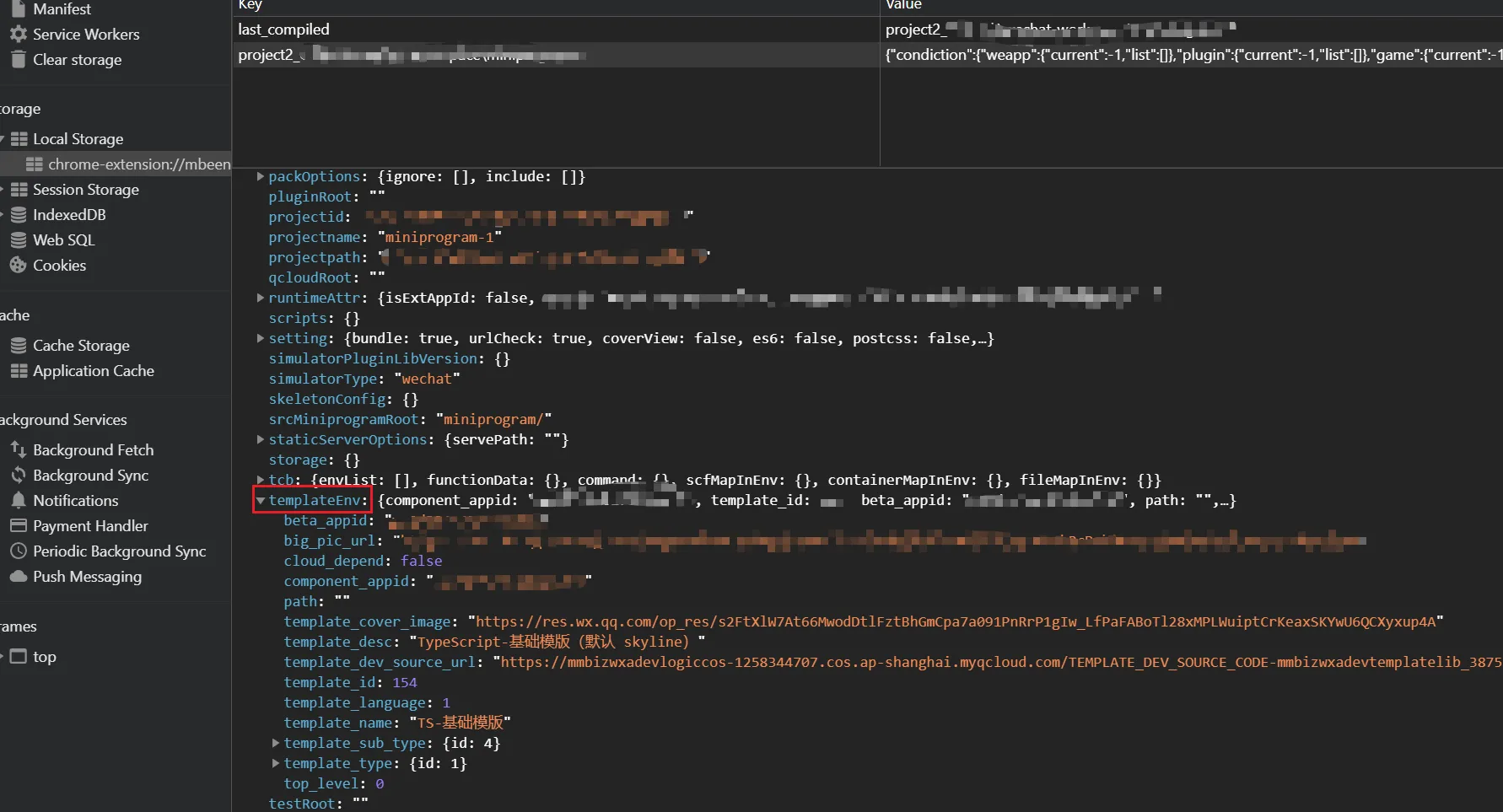
So the solution is:
- don’t use the default TS typings, use the official npm package - miniprogram-api-typings to manage all the typings manually
3. Webview Preview is blank
From the official doc, in Wechat DevTools, webview is rendered by the embedded Chromium from NW.js.
As for now, the used NW.js version is 0.54.1 and Chromium version is 91.
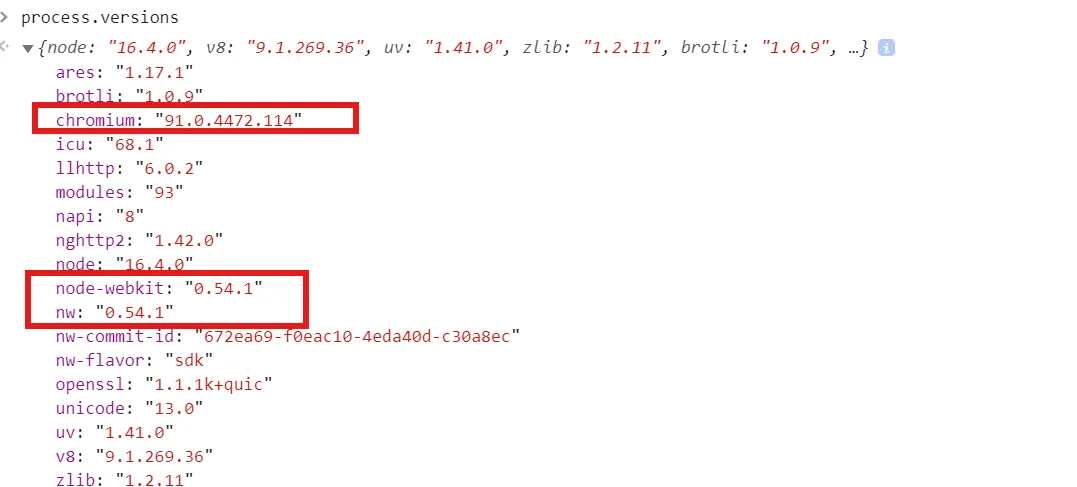
Then from caniuse, the total supported ES version is up to ES2021.
The scenario I met is: when loading an Angular project in the webview, always get blank from preview. Error like this:
Uncaught SyntaxError: Unexpected token '{'From the stack trace, the error comes from the code like this:
    static {
        xxxxxx
    }
So this is the feature - class static initialization block, which is the new feature in ES2022.And from caniuse, this feature is not supported in Chrome 91. So that’s the reason for the page is just blank in preview.
Also Angular defaults to ES2022 after Angular 17.
So the solution is:
-
downgrade the compiler version for the final javascript output.
Notes: if don’t have issue in real mobile, so maybe just have this change for debugging in local environment only.
4. Build NPM error for optional chaining
When trying to run the Build NPM menu, prompt this error:
An Error Occupied
SyntaxError: parse js file (xxxxxxxx) failed: Unexpected token (63:13)
From the path above, found that the error is caused by the optional chaining usage.
From the above Issue 3, looks like Wechat mini-program should support up to ES2021, when trying to use in the code directly, no issue, but only issue for Build NPM.
After checking the code to pack npm, found that this issue is caused by acorn for packing npm, but acorn supports optional chaining after v7.3.0. So the version used by Wechat DevTools is still very old.
So the solution is: avoid use NPM dependencies with ES2020+ format right now.